User Guide
Mobile PWA
iOS / Android web app at /m/* — install to home screen for native feel.
Mobile-optimized web shell at /m/today. Works on any device. Add to home screen for an icon-launchable app experience. Service worker pre-caches the 4 shell URLs + stale-while-revalidate caching for everything else.
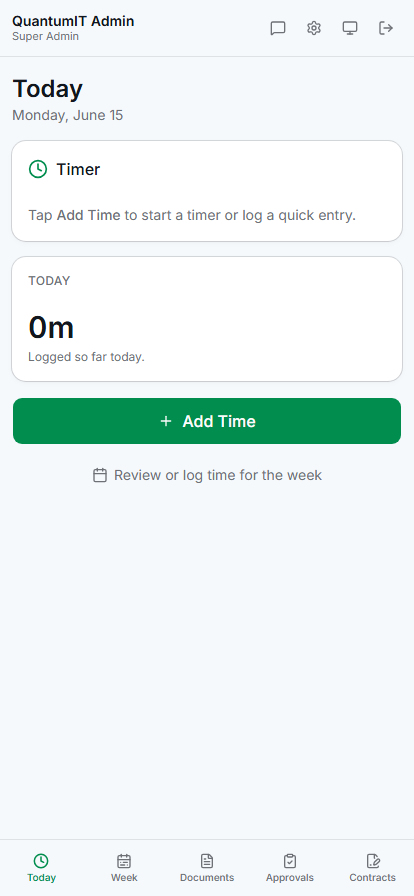
5 bottom-nav tabs
📅
Today
Running timer card (start / pause / stop & save) + today's logged hours summary + "+ Add Time" CTA opening a bottom sheet.
📆
Week
Vertical day cards Mon-Sun with status pills. Tap a day to edit a cell (sheet). Submit Week button at the bottom.
📄
Documents
Read-only view of HR documents attached to the user. Download links per file.
✅
Approvals
Managers see pending weeks; tap to drill into per-week review with Approve / Reject sheet.
✍️
Contracts
Pending signatures with in-app sign sheet using the same audit shape as desktop.
Add Time bottom sheet
Tap "+ Add Time" → bottom sheet with project dropdown + duration input + optional description. Two actions: Save (creates a draft entry immediately) or Start Timer (starts a real-time timer that you can stop later). Numeric pad on mobile for the duration input.
Email reminders
🔔
Submit reminder
Friday 3pm (user's timezone) for billable users with outstanding draft hours.
✅
Week approved
Fires immediately when a manager approves your week.
❌
Week rejected
Fires immediately with the manager's verbatim reason.
Configure under Settings → Profile → Notifications. Per-user timezone override available so a Pacific consultant gets reminders at 3pm PT, not 3pm UTC.
Tip
The "Switch to desktop" link in the mobile header lets users opt out of the mobile shell when they'd rather use the full desktop UI on their tablet or large phone. Preference persists in localStorage so the next session honors it.
Installable PWA
- ✓Install prompt on Android Chrome + iOS Safari
- ✓Icon-launches like a native app (no browser chrome)
- ✓Service worker caches the shell for offline-tolerant viewing
- ✓Splash screen + theme color match TimeTrack Pro branding
What's not in mobile PWA (yet)
Phase 1 mobile scope is time entry + approvals + contract signing — the workflows that benefit most from being on a phone. Heavier admin surfaces stay on desktop: invoice generation, reports, bank reconciliation, settings / administration.